Tool Evaluation
Monitoring Tools Comparison: Choosing The Right System
Your organization chose the wrong monitoring tool two years ago. You've been missing opportunities since. Here's how to evaluate correctly.
The Wrong Tool Decision
Two years ago, your organization implemented a monitoring solution. It was cheap—$50/month. It could monitor SAM.gov. Your team thought that was enough.
But it only checked SAM.gov daily (not hourly). It couldn't filter automatically (you had to manually review every single opportunity). It didn't integrate with your email or Slack (you had to log in to check). Alerts took 12-24 hours. And it didn't monitor Grants.gov, state portals, or the Federal Register at all.
You've been catching maybe 40% of relevant opportunities. The other 60% went to competitors using better systems. Two years of missed federal capital. You never knew what you weren't seeing.
This is why tool selection matters. The difference between a $50/month tool and a comprehensive system is measured in millions of dollars in uncaptured federal capital.
What Makes a Monitoring Tool Actually Work
Most organizations have never evaluated monitoring tools systematically. They pick something cheap or familiar without understanding what determines whether a system actually catches opportunities or misses most of them.
Here's what separates tools that catch 95% of opportunities from tools that catch 40%:

Figure 1: Monitoring tools vary dramatically in coverage, speed, and intelligence. The difference between basic and enterprise tools determines your opportunity capture rate.
Five Critical Tool Evaluation Criteria
When evaluating a monitoring tool, ask these five questions. Each one determines whether you'll catch opportunities or miss them:
Criterion 1: How Many Data Sources Does It Monitor?
What matters: Tools that only monitor SAM.gov or Grants.gov miss 30-40% of opportunities posted on other federal sources, state portals, and agency-specific channels.
What to look for: Systems that monitor:
- SAM.gov federal contracts and grants
- Grants.gov federal grants
- Federal Register notices and announcements
- State opportunity portals (all 50 states)
- Agency-specific websites (departments you target)
- Industry-specific sources and trade associations
Red flag: Any tool that only monitors 1-2 major sources. You're missing 30-50% right there.
Criterion 2: How Often Does It Check for New Opportunities?
What matters: A tool that checks daily misses opportunities posted in the evening or overnight. A tool that checks hourly catches everything posted since the last check.
What to look for: Systems that check all sources at least hourly. Ideally 15-30 minute intervals to catch postings within hours of going live.
Red flag: Tools that check "once per day" or "multiple times per week." You're missing opportunities posted outside their check windows.
Criterion 3: Can It Filter Automatically or Only Manually?
What matters: Manual filtering means you review hundreds of opportunities to find the few relevant ones. You have decision fatigue. You miss nuances. You waste time.
Automatic filtering uses rules and intelligence to show you only opportunities matching your criteria: sector, geography, funding size, organization type.
What to look for: Tools with intelligent filtering that let you set criteria like:
- Sector (what industries you serve)
- Geography (states/regions you target)
- Funding size (only opportunities above/below certain amounts)
- Organization type (contracts vs grants, federal vs state)
- Keywords and exclusions (what you definitely don't want)
Red flag: Tools that show you everything and require manual review. You're paying for the tool but your team is doing the real work.
Criterion 4: How Fast Are Alerts and Where Do They Go?
What matters: An alert that reaches you 24 hours later is useless. An alert in your email that you see whenever you check email is slow. An alert that arrives in Slack/Teams immediately is useful.
What to look for: Systems that:
- Send alerts within 15-30 minutes of opportunity posting
- Deliver to Slack, Teams, email, SMS simultaneously
- Include enough detail to make a go/no-go decision immediately
- Alert decision-makers directly, not batched to a shared inbox
Red flag: Tools that only email alerts, alerts that come 12+ hours later, or alerts with minimal information requiring you to go look up the full opportunity.
Criterion 5: How Integrated Is It With Your Workflow?
What matters: If you have to log into a separate portal every time to access the data, you're adding friction. If the data integrates into your CRM, email, or project management tool, it becomes part of your workflow.
What to look for: Systems with:
- API integration with your CRM
- Slack/Teams integration for team notifications
- Email integration (forwards opportunities to designated inboxes)
- Dashboard access without login friction
- Mobile app or SMS alerts for when you're not at your desk
Red flag: Tools that require you to log into a separate portal every time. The friction will cause you to use it less.
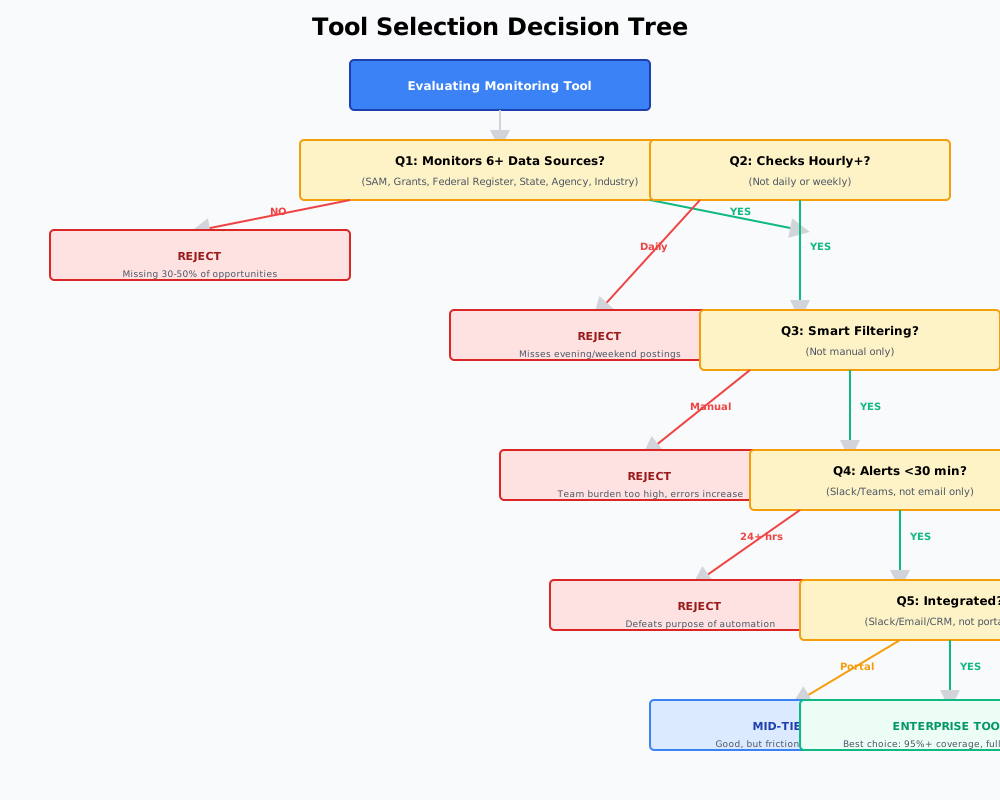
Figure 2: Use this decision tree to evaluate tools. Each criterion eliminated eliminates 20-30% of opportunities you'd otherwise catch.
Typical Tool Tiers and What They Deliver
Tier 1: Basic Tools ($50-200/month)
Coverage: Single or dual source (SAM.gov + Grants.gov typically)
Update frequency: Daily
Filtering: Manual
Alert speed: 12-24 hours
Opportunity capture: 40-50%. You're missing opportunities on Federal Register, state portals, and agency websites. You're also missing everything posted outside their daily check window.
Tier 2: Mid-Range Tools ($200-800/month)
Coverage: 3-4 sources (SAM, Grants, Federal Register, maybe state portals)
Update frequency: 4-6 hour intervals
Filtering: Partial automation (some rules, but still requires manual review)
Alert speed: 4-12 hours
Opportunity capture: 65-75%. You're catching most federal opportunities but still missing state and agency-specific sources. Alerts are still slower than ideal.
Tier 3: Enterprise Tools ($800-2000+/month)
Coverage: 6+ sources (all federal + state + agency-specific + industry)
Update frequency: Hourly or better
Filtering: Intelligent AI-based filtering with machine learning
Alert speed: 15-30 minutes
Integration: Full (Slack, Teams, email, API, CRM)
Opportunity capture: 95%+. You're seeing nearly everything your sector is doing. Alerts are fast enough to allow full proposal development.
The Financial Case for Enterprise Tools
A basic tool costs $50/month ($600/year). An enterprise tool costs $1500/month ($18K/year). That's a 30x difference. But look at what it delivers:
- Basic tool: 40% capture rate. If you have 20 relevant opportunities/year, you see 8. You pursue with quality proposals. You win 2-3. Capital captured: $500K-$1M annually.
- Enterprise tool: 95% capture rate. You see 19 of 20 opportunities. You pursue the best 8-10. You win 2-4. Capital captured: $1-2M+ annually.
The difference: $500K-$1M+ in additional annual capital captured. The tool costs $18K. ROI: 27-55x in year one.
Common Mistakes in Tool Selection
Most organizations make one of these mistakes when choosing a monitoring tool:
Mistake 1: Choosing Based Solely on Price
A $50/month tool that catches 40% of opportunities costs you $500K+ in missed capital annually. Saving $18K/month on the tool while losing $500K+ in opportunities is terrible math.
Mistake 2: Choosing a Tool That Doesn't Fit Your Sectors
You operate in healthcare and clean energy. The tool you chose monitors SAM.gov and Grants.gov well but doesn't monitor state healthcare boards or renewable energy-specific funding sources. You're blind to 30% of your real opportunities.
Mistake 3: Choosing a Tool With Poor Filtering
You spend 2 hours per day reviewing hundreds of opportunities that aren't relevant to your organization. Your team member is doing manual work the tool should be doing automatically.
Mistake 4: Not Testing Before Committing
You implemented a tool without running it parallel to your existing system. You didn't know if it was catching the same opportunities. You committed to a tool that was missing 30-40% of what your old manual process caught.
How to Evaluate a New Tool
Don't just sign up based on a demo. Follow this process:
- Week 1-2: Pilot parallel. Run the new tool alongside your current process. Don't replace anything yet.
- Week 3: Compare coverage. Did the new tool find the same opportunities as your current system? Did it find any you missed? What did it miss?
- Week 4: Evaluate filtering. Does the filtering work well for your organization? Are you getting false positives (irrelevant opportunities) or false negatives (missing good ones)?
- Week 5: User experience test. Is the tool easy for your team to use? Do alerts reach the right people? Is the integration smooth with your workflow?
- Decision: Full transition or rejection. Based on the 5-week evaluation, do you switch completely or look for another option?
The Real Cost of Wrong Tool Selection
If you choose a tool that catches 50% of opportunities when a better tool catches 95%, the cost isn't the $18K/year difference in tool cost. The cost is:
- 45% of federal capital in your target sectors that you never see
- Proposals you never write because you didn't know opportunities existed
- Competitors winning deals you could have pursued
- Year after year of 3-5 fewer wins than you could have captured
Over 5 years, that gap is measured in millions. Get the tool selection right the first time.
Choose The Right Monitoring Tool
Not all monitoring tools catch the same opportunities. Enterprise-grade systems find 95%+ while basic tools miss 40-50%. Get the evaluation right.
Explore Capital Event Intelligence6+ data sources. Hourly updates. Smart filtering. 15-minute alerts. 95%+ coverage. Full integration.